3D room placement in Godot: build rooms and stack storeys
3D room placement in Godot 4: place a whole room as one object on a GridMap, stack the same room on the storey above, and read the refusals it hands back.
 Watch the room placement walkthrough
A room in a base-building game is not a floor with walls dropped on top of it: it is one object, placed in one click, and the same object is what the player puts on the storey above. This walkthrough sets that up in Grid Placement: one catalog entry per room size, the snap profile that makes an entry a room, a row of them, a second storey, and the three refusals that keep the result honest.
Use Grid Placement 6.2.3 or newer before you start. That is the first release that books 3D
occupancy per storey, which is what lets the same room entry stand on the room below it. On 6.2.2
and earlier the panel is the same and the entries are the same, but a room placed one storey up over
another is refused with Cell (0, 0, 0) is already occupied. The
patch notes cover the rest of what
changed; this page stays on the procedure.
One thing to get out of the way first, because it decides whether the rest applies to you: the
camera is your game's, not the plugin's. GridPositioner3D.camera is a reference. The 3D setup
keeps the Camera3D your scene already has, spawns one only when the scene carries none, and never
re-aims yours. Everything below works in a fixed front view, a top-down view or a camera the player
turns; the parts that must change for 3D are the entry data and the node wiring, and those are the
plugin's own components.
Run the editor setup presses
Four commands under Project → Tools → Grid Placement do the work a hand-built placement rig takes a day to assemble. They are additive: each one fills in what is missing and leaves existing nodes and values alone.
| Command | What it does |
|---|---|
Setup Default Input Actions |
Writes the placement actions into the project's Input Map. |
Setup Scene (pick 3D) |
Adds the 3D rig to the open scene and writes its session, bundle, catalog and terrain entry beside the scene. |
Setup UI |
Adds PlacementPanel, pointed at that session. |
Validate Current Scene Setup |
Checks the open scene's host/session/level wiring. |
Setup Scene adopts the GridMap you already have as the level surface and the camera you already
have as the one the positioner aims through. It creates only what is missing — GridPlacementHost,
Objects, PlacementLevelContext, PlacementOwner, GridPositioner3D — and prints what it created,
what it preserved, and two needs config lines. Those two lines are reminders, not outstanding work:
it prints them even when it has just wired both. The output is worth reading once, because it names
the three links that decide whether placement works at all: the level context's target_map_3d (your
GridMap), the owner's owner_root (the node the player steers), and the positioner's camera.
3D room placement starts with the catalog: one entry per size
Select GridPlacementHost and open Session → Catalog → Scene Entries. Each room size is one
ScenePlacementEntry; two rooms of the same size are the same entry placed twice. Add 1x1, 2x1
and 3x1 in ascending order so the panel reads the same way.
Nothing here reaches the game until you save the scene. Setup Scene wrote the catalog to
grid_placement/catalog_3d.tres beside the scene and pointed the scene at that file, so the inspector
and that file are one list — edit either.
The snap profile that makes a room a room
A room entry differs from a prop in four fields on its entry and five on its snap profile. The entry:
packed_scene (the room's own scene), display_name, footprint_3d (Vector2i(2, 1) for a 2x1),
and at least one PlacementProfile in profiles — with none, the panel shows no category tab and the
entry cannot be selected at all.
The snap profile is where receipt of "this is a room, and it may stand on another room" lives:
| Field | Value | Why |
|---|---|---|
snap_mode |
CELL |
The room fills whole cells and claims them. |
family |
room |
One name for every room, on every storey — it hosts itself. |
occupy_columns |
on | The room books each cell of its footprint on the row it stands on. |
require_column_support |
on | Every covered cell needs an accepted piece, or the plot, directly underneath. |
snaps_with |
["ground", "room"] |
The plot counts as underneath; so does another room, which is what makes the next storey legal. |
attachment_requirement |
Optional |
The first room of a row can be placed with nothing beside it. |
Those last three are the whole stacking mechanism, and they are authored per entry — the plugin inspects nothing in your room scene to infer them. Two mistakes are worth naming because both look harmless in the inspector:
occupy_columnsoff on a room. The room stops claiming its row, so nothing refuses a second room that overlaps it there. Overlays (floors, roofs, decks sharing a cell with the piece below) are the case that wants that; a room is not.require_column_supporton a piece that should never stack. It lifts the grounding rule, so the piece may anchor above the terrain, waiting for support that a room-only scene never provides.
Let the panel list your rooms
Run Setup UI and the PlacementPanel appears under UI. Expand it and look at
SceneEntrySelectionUI → Category Profiles: it is empty, and that is correct. The panel builds its
tabs from the entries the catalog lists, so there is nothing to drag in and nothing to write.
Save the scene here. This is the step people skip, and it fails silently: the panel and the catalog are both in the scene you are editing, and the game you run reads the file on disk.
Place a whole room in one click
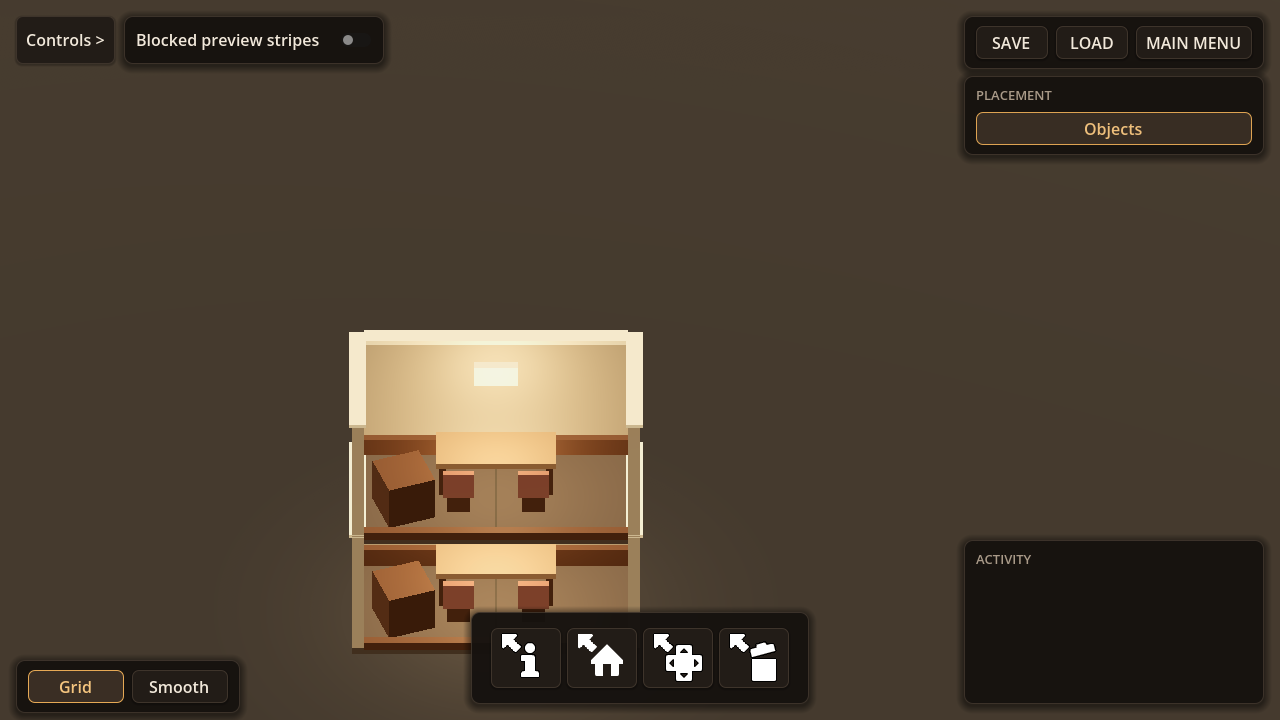
Pick a room in the panel, then hover free cells on the plot. The preview must be green, and it must cover the whole footprint before you click — a 2x1 covers two cells, not its anchor cell. One click is one commit: the slab, the walls and the shell arrive together, as one object.
The room scene's root sits at the centre of its footprint, not on a corner: a 2x1 room's origin is the shared grid line between its two cells, which is why one commit spans both.
Build a row
Select the next size and click the cell beside the first room. Rooms butt up on the grid line with no extra rule, and each one is still a single object.
They are also still separate shells: two adjacent rooms produce two thin walls with a gap between
them, not one shared wall. The plugin has no "merge these rooms" step, and it is worth knowing that
before you author art that assumes otherwise. If your rooms should open a doorway where a neighbour
sits, that is a game-side hook on object_placed, not a placement rule — the
Custom Placement Rules guide covers it.
Stack a second storey on the first
With the same room selected, hover a room you already placed. The cursor resolves the cell one row up on that column by itself, and the ghost stands one storey up. Click, and that is the second storey — the same entry, the same scene, no upstairs variant and no storey selector. Hover the room you just stacked and it resolves the row above that: a third storey is the same one click.
Three rules fall out of the profile fields above, and each one is the plugin talking rather than your game:
- Occupancy is booked per storey, for entries that ask to stack. A room on row 0 and a room on
row 1 of the same column are two claims, not one conflict — which is what makes the stack legal
while
occupy_columnsstays on, so a second room that overlaps either of them on its own row is still refused. - Support is per column. Every covered cell asks the cell directly below it for a family in
snaps_with.groundlets the ground floor rest on the plot;roomlets every storey above rest on the one below. An adjacent room does not count. - The room below is load-bearing. Removing it while a room stands on top is refused, because the same check that validated the placement finds nothing to hold the storey.
Where the piece lands is the cell under the cursor, not the anchor of the room underneath: aim the middle of a 3x1 and the room above sits one cell across from the room below. Camera height decides which storey you see into, which is why the pose is worth authoring deliberately rather than leaving at the default.
What 3D room placement refuses
Every refusal below comes from the plugin's own validation, not from game code, and every one of them can be read on screen before and after the click:
| Attempt | What it says |
|---|---|
| A room on cells another room covers on that same storey | Cell (0, 0, 0) is already occupied. |
A footprint that runs past the GridMap plot |
No ground under this spot. |
| A room one storey up with nothing underneath | 'Room 2x1' (family 'room') needs the ground or a piece underneath every covered tile: the column below each cell must hold ["room"], or the level's ground. |
| The same room at the same cell and rotation | 'Room 2x1' is already placed here at this rotation. |
The coordinates follow your own cells; the reasons are the same. The third line is the one a room builder needs: the first line of that refusal says the row is unsupported, and the second says by what, which is the difference between "the game is broken" and "build the ground floor first".
Check it in your own project
Run Project → Tools → Grid Placement / Validate Current Scene Setup on the scene you wired, then
enter it, select a room and hover a cell: the preview should cover the footprint and turn red exactly
where the table above says it will. If a room places but cannot be taken back, the room scene is
missing its Manipulatable component — that is a scene authoring gap, not an aiming bug.
The claims on this page are pinned to the shipped 6.2.3 source by the plugin's own suites, run
against the release tag: stack_target_climb_test.gd (the cursor resolving the storey above),
placement_validation_column_support_test.gd (per-storey occupancy and the support refusals) and
room_column_support_e2e_test.gd (a room stacked on a room, end to end, including the refusal to
remove the one underneath).
What this walkthrough does not cover
- The room art. Floors, walls, a doorway and the cutaway cues that make a room read from the front are the room scene's own authoring, and none of it changes placement. The 3D Object Placement guide is the reference for mounts, footprints and snap families.
- Saving. Placed rooms persist through the plugin's own records; the Save and Load guide covers the persistence node.
- Rules only your game knows — rooms on the front row, a reserved band, a cost. Those are a
PlacementCellPolicy3Dyou write and attach to the entry, documented in Custom Placement Rules. - The per-size entry dance. If you would rather have the rig and a room list written for you, One-Click Setup walks the same presses with fewer decisions.
The video walkthrough covers the same presses in the same order, and the 3D grid placement setup tutorial is the video for the rig this page builds on.